Core Concepts
How It Fits Together
One notification from an automation can turn into several different notifications, each one shaped for the way it's sent.
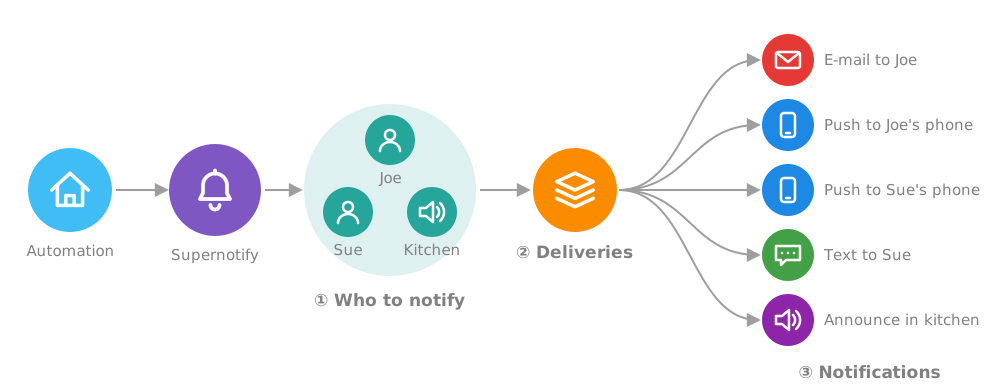
- Targets - people are turned into the ways they can be reached, using their Recipient details
- Deliveries - the Deliveries that apply are chosen, by default or by Scenarios
- Notifications - each delivery picks out the targets it can use, and sends a notification suited to it, so an e-mail can have a full HTML layout and pictures, while the kitchen speaker gets a short spoken message
Target
- Who or what gets notified and how
- Direct targets
- e-mail address
- phone number
entity_idordevice_id, for example to make announcement via Alexa device- a custom ID for a specialist transport like Telegram
- Indirect targets, which can be turned into direct targets
person_idto use the Recipient features- standard Home Assistant target selectors,
label_id,floor_idandarea_id. - Group targets (both new and old style Home Assistant groups)
- Targets can be qualified for a specific Target Category, like
discord_channel:839439434, see Category Prefixes for more info. - Targets are picked off the list by notifications by the best integration to handle it.
- For example, a Notify Entity on Alexa Devices will be handled by the Alexa Devices transport whereas a generic Notify Entity would fall back to the less capable Notify Entity transport.
- See Targets for more information
Recipient
- A person, with optional e-mail address, phone number, mobile devices or custom targets.
- By default auto-discovered from the User accounts and Person entities already on Home Assistant
- This makes it easier to refer to people in automations, use
person.joe_mctestrather than trying to remember Joe's email address in every automation notification. Also works for phone numbers if compatible SMS integration installed, or custom identifiers like Telegram or Discord. - Each recipient also has a Home Assistant
switchentity, so it's easy to stop someone being bothered by notifications - See People and Recipes for more detail
Transport
- Transport is the technical means to actually notify, usually by using one of the already installed Home Assistant integrations.
- Transport Adaptors are what make the difference between regular Notify Groups and Supernotify.
- While a Notify Group seems to allow easy multi-channel notifications, in practice each notify transport has different
data(anddatainsidedata!) structures, addressing etc so in the end notifications have to be simplified to the lowest common set of attributes, like justmessage! - Supernotify comes out the box with adaptors for common transports, like e-mail, mobile push, SMS, and Alexa, and a Generic transport adaptor that can be used to wrap any other Home Assistant action
- The transport adaptor allows a single notification to be sent to many platforms, even when they all have different and mutually incompatible interfaces.
- They adapt notifications to the transport, pruning out attributes they can't accept, reshaping
datastructures, selecting just the appropriate targets, and allowing additional fine-tuning where it's possible. - Each transport has a default configuration, which allows lots of fine tuning and defaults to be made, saving need to add the same values into every notification.
- See Transports for more detail
Delivery
- A Delivery defines each notification channel you want to use
- Out of the box, every Transport has a Delivery with the same name, for example
emailormobile_push. - Some transports will auto create additional deliveries, like
alexa_devices_announce_allorchime_siren_all - Using YAML more deliveries can be created, for example
html_emailin addition to plain textemail, or different deliveries for particular voice assistants. - Transports which can definitively select targets, like Email, Mobile Push, SMS, Alexa Devices and Notify Entity, are included by default in handling targets.
- Others can be included via configuration, by using Scenarios or asking for them to be included in a notification
- You can define your own deliveries, with a name of your choosing, and have multiple deliveries for a single transport, for example a plain
emailandhtml_emaildeliveries. - The Generic Transport acts as a toolbox for creating a delivery for almost anything Home Assistant could do that's not already covered by a standard Transport
- See Deliveries and Recipes for more detail
Scenario
- A package of settings that can be switched on by name, or automatically by Home Assistant conditions.
- Scenarios can be manually selected, in an
apply_scenariosvalue of notificationdatablock, or automatically selected using a standard Home Assistantconditionsblock. - Conditions include the text of the message, so a Frigate notification about birds on the patio could be notified differently than a prowler at a window
- Use scenarios to make notifications less obtrusive at night, or more festive on holidays, or prioritize some messages
- They make it easy to apply overrides in one place to many different deliveries or notifications, and are the key to making notification calls in your automations radically simpler
- See Scenarios and Recipes for more detail
Priority
- An urgency level for notifications
- There is no standard way to prioritize notifications, within or outside Home Assistant
- Supernotify has its own 5 level scheme, which follows the most common practices, from
minimumtocritical - Priority can be used for things like scenario and delivery rules, and passed onto notify integrations that support it
- Supernotify has its own e-mail integration, which will translate priority into a way Outlook, Apple Mail etc can understand
Info
For the technically minded, there's a Class Diagram of the core classes matching these concepts.
Core Principles
- All a notification needs is a message, everything else can be defaulted, including all the targets
- If you define something in an action call, it takes precedence over the defaults - This can be tuned by things like
target_usage- The people registry is only used to generate targets if no targets given - Action > Scenario > Delivery > Transport for configuration and defaults
- As unfussy as possible about how it is configured and called - Targets can be structured into sub-categories, or a big list of entity ids, device ids, emails and phone numbers - Action
dataoptions likedeliverycan be a single value, list or dictionary mapping
Developers
See Developer Concepts for how notifications flow through deliveries, targets and Envelopes, and the Design Principles.