Scenarios
What and Why
Scenarios can be defined both as a set of conditions which switch on the scenario and/or as a set of overrides to apply if the scenario is active.
For example, a scenario could be defined by conditions such as alarm panel arm state, occupancy and time to indicate when notifications should be minimized, and then different chime sounds could be selected or deliveries switched off.
Scenarios can override specific delivery configurations, general media configuration (such as setting a camera, or specifying which alert sound to use for a mobile push ) and disable implicit deliveries. Scenarios can be as small or as large as you want - it could define an entire set of deliveries, or patch a single value.
Usage Modes
Minor
- Couple of scenarios added to a minimal Supernotify configuration to redirect notifications based on occupancy, priority etc
Medium
- Scenarios used to factor out common code from multiple
deliveryconfigs in Supernotify, or complicated automations, sequences, scripts, appdaemon apps etc.
Major
- Fully scenario driven configuration
- All
deliveryconfigurations haveinclusion: scenarioorinclusion: explicitset so they are not enabled by default - From v2.10.0 there's a quick switch in Delivery Control options to do this in the UI for all deliveries
- Notifications that don't match a scenario get dropped
- Alternatively, a fallback delivery can be selected if every message goes somewhere
- This is a good option when you're comfortable with the integration and its configuration, and you have noisy notifications, which should be either dropped, or result only in a chime ringing or an Alexa sound playing.
- Even if no notification occurs, there can still be an archive notification, to file system or MQTT as a record, for example if you are experimenting with tuning out noise, see Archive.
- All
Switching on Fully Scenario Driven Configuration
In these example settings, a fully scenario driven configuration has been chosen by setting default Delivery Inclusion to "Delivery Must Be Selected in Action or Scenario" ("Delivery Must Be Selected in Scenario" would also work, but wouldn't have option to override in actions)
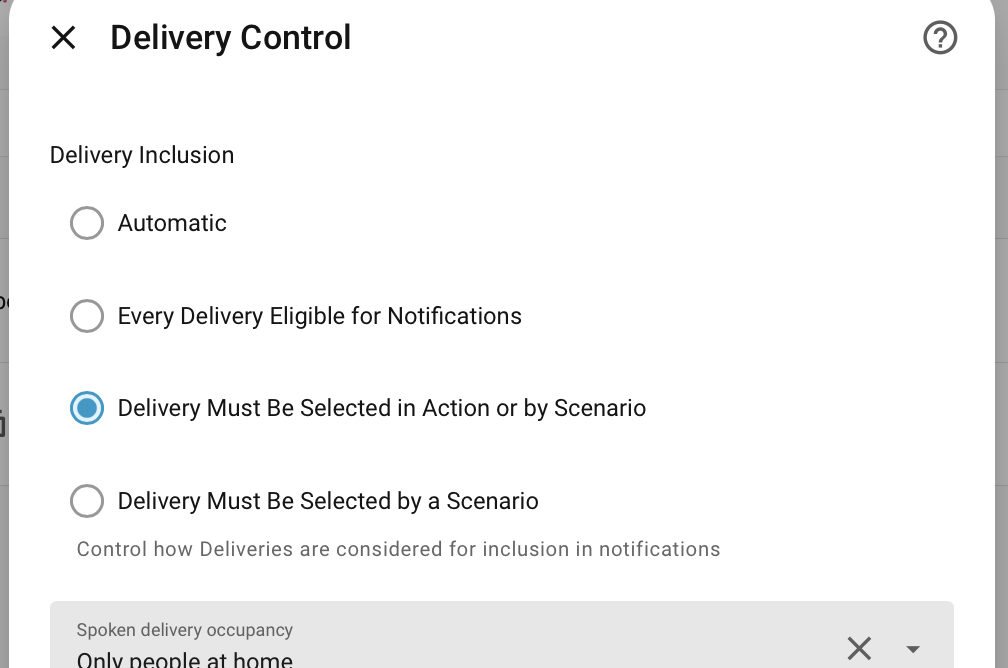
Its also possible to use the same Delivery Control options to have a fully Action Driven Configuration, but this means remembering to put a list of deliveries in every single action notification, whereas scenarios can do that once for all automations, and you only have to change it in one place.
Conditions
For more on the conditions, see the Home Assistant Conditions documentation since the conditions are all evaluated at time of notification by the standard Home Assistant module.
Supernotify also adds more context variables to use in conditions, see the full list on the Condition Variables section. You can use these to switch on scenarios based on the notification priority, or even patterns of words in the message or title - see Content Escalation Recipe for an example.
Tip
There's a Scenario Schema defined for the configuration, and debugging hints
Examples
This scenario could be used to select more obtrusive notifications, like email or Alexa announcements, from a combination of conditions, hence simplifying separate notification calls, and providing one place to tune multiple notifications.
more_attention:
        alias: time to make more of a fuss
        conditions:
          condition: and
          conditions:
            - not:
                - condition: state
                  entity_id: alarm_control_panel.home_alarm_control
                  state: disarmed
            - condition: time
              after: "21:30:00"
              before: "06:30:00"
In this example, selecting the scenario by name in a notification call switches on a set of delivery transports, which saves repetitive declaration in many notification calls. Delivery Selection is made implicit so not switching off any other deliveries that would have applied.
scenarios:
  red_alert:
      delivery:
        chime_red_alert:
        upstairs_siren:
        downstairs_siren:
      media:
        camera_entity_id: camera.porch
Entities
Each scenario has a switch.supernotify_scenario_<name> entity, on the SuperNotify device, to enable or disable the scenario at run-time, for example from a dashboard or an automation. A disabled scenario never applies to a notification. This lasts across restarts and reloads, until the scenario's enabled value in the configuration is changed, or it is put back as configured using the supernotify.reset_overrides action - see Overrides.
The scenario's configuration is available as attributes of its switch.supernotify_scenario_<name>. Whether the scenario's conditions currently hold is shown by its binary_sensor, see Scenario Sensors.
Overriding Delivery Selection and Configuration
Each delivery section within scenario has an enabled value, which defaults to true.
true- This delivery will be enabled even if it is not an implicit deliveryfalse- This delivery will be disabled, whether it is an implicit one, or selected by another scenario- Empty - The delivery configuration will only be used to override the definition of a delivery that has already been selected, and if not, will be ignored when the scenario applied. Especially useful with [Wildcard Deliveries].
If two active scenarios disagree on the same delivery, false always wins over any number of scenarios saying true - see When Scenarios Disagree for the full explanation and the one way to override it.
See the Seasonal Greetings Recipe for an example where the null value of enabled is useful.
Lists and single values can also be used, if the only need is to switch on deliveries. These all do the same, so it is kinder on everyone who sometimes gets their YAML styles mixed up.
scenarios:
  style_1:
    alias: Switch on email
    delivery:
      email:
  style_2:
    alias: Switch on email
    delivery:
      - email
  style_3:
    alias: Switch on email
    delivery: email
Scenario Selection at Notification
Conditions aren't essential for scenarios, since they can also be switched on by a notification.
For example in this case, where the home_security and garden scenarios are explicitly triggered by using apply_scenarios, and so any overrides declared in those scenarios will be applied. Other scenarios may also select themselves based on condition logic.
The constrain_scenarios prevents any scenario other than unoccupied or the ones explicitly applied here ( to switch off all other scenarios, use NO_SCENARIO). Constraining a scenario doesn't actually select it, only permits it if otherwise selected by a condition, and it doesn't affect scenarios explicitly switched on in the same data block by apply_scenarios.
  - action: supernotify.notify
    data:
        title: Security Notification
        message: '{{state_attr(sensor,"friendly_name")}} triggered'
        priority: high
        apply_scenarios:
          - home_security
          - garden
        constrain_scenarios:
          - unoccupied
Overriding Content
Individual deliveries can be overridden, including the content of the messages using message_template and title_template. The templates are regular HomeAssistant jinja2, and have the same context variables available as the scenario conditions (see below ). In the example below, Alexa can be made to whisper easily without having to mess with the text of every notification, and this scenario could also have conditions applied, for example to all low priority messages at night.
  scenarios:
    emotional:
      delivery:
        alexa:
          data:
            title_template: '<amazon:emotion name="excited" intensity="medium">{{notification_message}}</amazon:emotion>'
Using Scenarios to Suppress Notifications
Using required_scenarios, a notification can be generated that will only be delivered if one of the listed scenarios has an active condition.
  - action: supernotify.notify
    data:
        title: Hallway PIR
        message: Somebody in the hall
        required_scenarios:
          - nobody_home
Multiple Scenarios
Multiple scenarios can be applied, in the order provided, and each template will be applied in turn to the results of the previous template. So in the example below, you could apply both the whisper and emotion Amazon Alexa markup to the same message, or add in some sound effects based on any of the conditions.
A blank message_template or title_template can also be used to selectively switch off one of those fields for a particular delivery, for example when sending a notification out via email, push and Alexa announcement.
Wildcard Deliveries
Delivery names can use regular expressions rather than literal names. For example, to suppress notifications by disabling all deliveries:
Any valid regular expression can be used, so for example if there are many "chime" deliveries:
Regular expressions can be mixed and matched with literal delivery names, where there is a clash the literal name will work, where 2 regular expressions resolve to the same delivery, the last one to be applied is used.
All deliveries are enabled by default - which makes regular scenarios easier to use - though can mean that a wildcard switches on more deliveries than might be the intention. A wildcard pattern on its own does not mean deliveries are selected, use an explicit enabled: true to do this.
For example, to override the priority for deliveries, without affecting deliveries that would otherwise not be selected.
Scenario Sensors
Each scenario is exposed as binary_sensor.supernotify_scenario_<name>, reporting whether its conditions currently hold: on or off. Scenarios can be prevented from being exposed this way using expose_state: false in their configuration.
This is separate from whether the scenario itself is enabled, which is what the scenario's switch shows and controls. A scenario switched off will always have a binary_sensor that's off, whereas a scenario that's switched on will have a binary_sensor that's on or off depending on the condition. A scenario that only applies on a couple of days a year has a switch that stays on all year, and a binary_sensor that is on only on those days.
Scenarios with conditions have binary_sensor that are read-only: writing its state does not enable or disable the scenario. Scenarios without conditions can be externally controlled by your own automations, dashboard toggles etc and have read/write binary sensors. This can be useful if the condition would be too complex to write in Home Assistant conditions logic.
Manual control of scenarios via binary_sensor only affects which ones get automatically selected for deliveries. If a delivery declares apply_scenarios, then those scenarios will be selected regardless of manual setting.
Live Scenarios
The state is kept current in two ways. A change to an entity referenced by a scenario's conditions re-evaluates the scenarios that depend on that entity, immediately. A periodic sweep then covers what no entity change can announce: time windows, sun position, and templates whose dependencies could not be determined statically.
Evaluating conditions costs whatever those conditions cost, which for template-heavy scenarios on small hardware is worth controlling, so the section below is needed to switch it on.
scenario_control:
  refresh: true        # false subscribes to nothing and starts no timer
  refresh_interval: 60 # seconds; 0 keeps the reactive path and drops the sweep
An individual scenario can be kept out of it, which is useful for one expensive template among otherwise cheap scenarios:
scenarios:
  everything_open:
    expose_state: false
    condition:
      - condition: template
        value_template: "{{ states.binary_sensor | selectattr('state','eq','on') | list | count > 3 }}"
Such a scenario still works normally for notifications; it simply has no binary_sensor.