Duplicate Detection
Three duplicate detection policies are available:
dupe_policy_message_title_same_or_lower_priority- Suppress messages with the same message and title that appear within the time to live period, unless the newer message has a higher priority.
- This is the default, including if duplicate detection has never been configured
dupe_policy_message_title_same- Suppress messages with the same message and title that appear within the time to live period. Ignore priority.dupe_policy_none- Don't suppress duplicate messages at all.
What Counts as a Duplicate
Duplicates are checked for each delivery and its resolved targets, so the same message is only suppressed if it would go to the same people or devices, by the same delivery, as one already sent. The same message sent by email and by mobile push isn't a duplicate, and nor is the same message sent to someone it wasn't sent to before.
Two notifications are the same if they have:
- The same message and title, after digits and punctuation are removed. For a spoken transport, such as
ttsoralexa_devices, it's the spoken message that's compared, if there is one. - The same delivery and the same resolved targets
- The same camera, and the same
clip_url, if there's media attached. Thesnapshot_urlisn't compared, since Frigate and other NVRs create a new one for each detection, even for the same ongoing scene.
Removing digits and punctuation means two messages that only differ in a count, a time or a date are duplicates, for example Washing machine finished at 14:02 and Washing machine finished at 14:05. It also means Door 1 open and Door 2 open are duplicates, so put what makes a message different in words, like Front door open and Back door open, or use force_resend.
Only what was actually sent is remembered. If a delivery fails, sending it again straight away isn't suppressed.
Configuration
Duplicate detection is set in the integration's options, from Configure on the integration in Settings → Devices & Services.
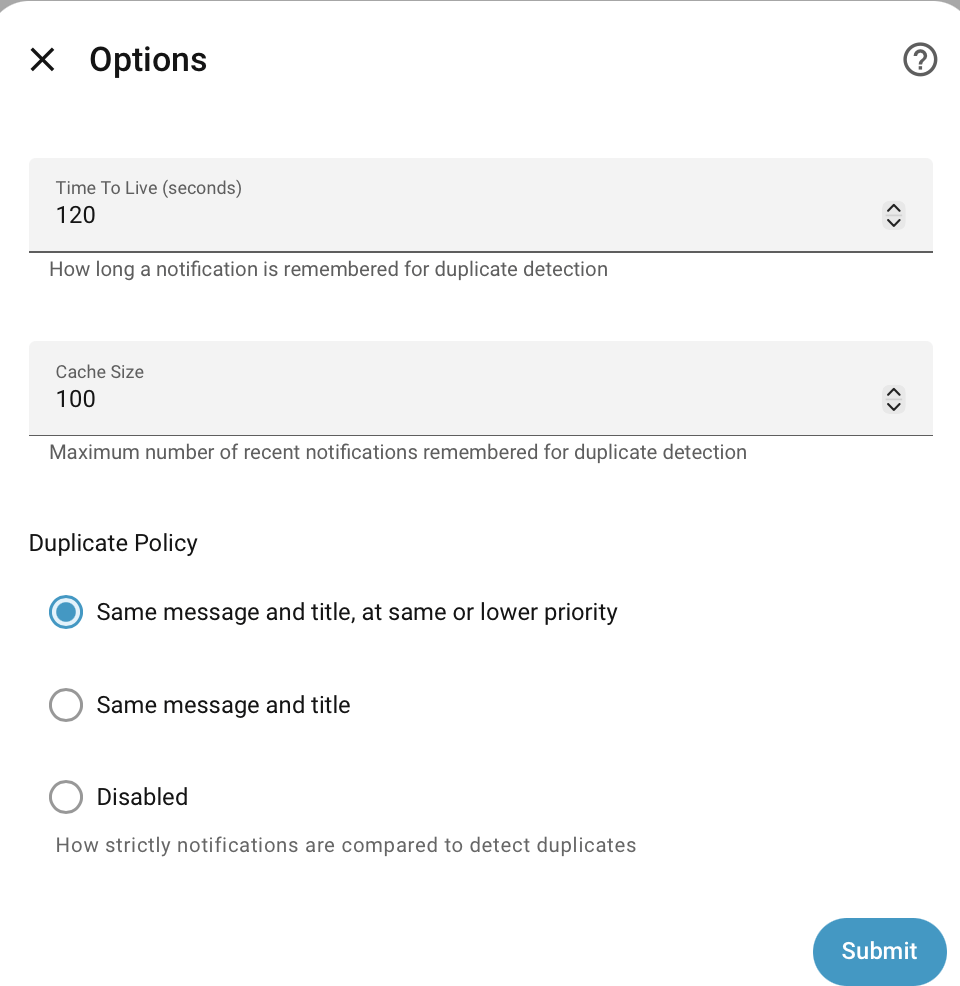
| Option | Default | Description |
|---|---|---|
ttl | 120 | Seconds before the same message can be sent again without being suppressed |
size | 100 | How many recently sent messages are remembered, the oldest forgotten first |
dupe_policy | dupe_policy_message_title_same_or_lower_priority | One of the policies above |
A dupe_check: section in the top-level supernotify: YAML is ignored, with a repair raised to say so. A dupe_check: in the old notify: - platform: supernotify YAML is only used to fill in the options once, when migrating from Supernotify v1.
Recently sent messages are only remembered in memory, so they're forgotten when Home Assistant restarts, or when Supernotify is reloaded, which includes changing any of its options.
Overriding
Set force_resend: true on the top level of the notification action data to override any dupe detection, just for that message. It can also be set in a delivery's data, to always send that delivery even when it's a duplicate.
Outcome
A notification where nothing was sent because everything was a duplicate has the dupe outcome, which can be used to choose what is archived, and shows in the logbook. If some of a notification was sent, and the rest was a duplicate, the outcome is for what was sent. A delivery skipped as a duplicate has DUPE as its last_skip_reason.