Basic Concepts
How It Fits Together
One notification from an automation can turn into several different notifications, each one shaped for the way it's sent.
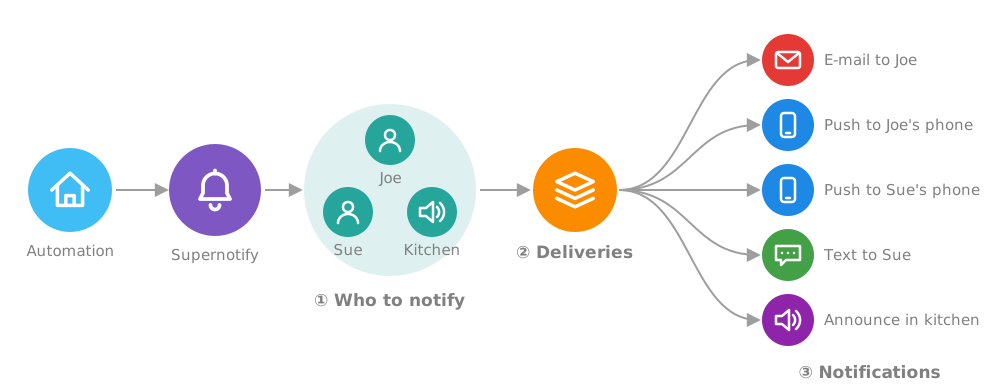
Reading the picture from left to right:
- Who to notify - the targets. People are turned into the ways they can be reached, using their recipient details
- Delivery - the deliveries that apply are chosen, by default or because you asked for them
- Notifications - each delivery picks out the targets it can use, and sends a notification suited to it, so an e-mail can have a full HTML layout and pictures, while the kitchen speaker gets a short spoken message
Three words cover almost everything in a UI-only setup.
Target
A target is who or what gets notified: a person, a phone, a speaker, an e-mail address, or an area, floor or label that stands for several devices.
Leave targets out, and the notification goes to everyone.
Recipient
A recipient is a person, as Supernotify knows them: their phones and tablets, and optionally an e-mail address and phone number. Recipients are found automatically from the Person entities in Home Assistant.
A recipient is not a different kind of target. A person is one of the things a target can be, and the recipient is where Supernotify looks up how to reach them. That is why person.joe_mctest works as a target, and you don't need Joe's e-mail address in every automation.
Delivery
A delivery is one way of sending a notification, with a name, like mobile_push, email or alexa_devices_announce_all. Supernotify creates deliveries for whatever it finds in your Home Assistant, and they are what appears in the Delivery box of the supernotify.notify action.
Leave deliveries out, and Supernotify uses the ones that can work out for themselves where to send, like mobile push and e-mail.
Priority
Priority is how urgent a notification is, on five levels: minimum, low, medium, high and critical. It is optional, and medium if not given. Priority is passed on to the phones, e-mail programs and other things that understand it.
Two More, for Later
These come up throughout the documentation, and neither is needed to get started.
- A Transport is the technical means behind a delivery, usually a Home Assistant integration such as mobile app, SMTP or Alexa Devices. A delivery is a transport plus the settings to use with it, so one transport can have several deliveries, such as a plain
emailand anhtml_email. - A Scenario is a package of settings with a name, which changes which deliveries are used and how they behave, for example quieter at night. Scenarios are set up in YAML.
Advanced Concepts covers both, and the rest of what YAML configuration can do.