Recipe - Someone's at the Door
Purpose
Have the speakers say that someone is at the door, then add a picture from the porch camera for the phones. A good first automation after the Quick Start, and the first two steps need no Supernotify configuration at all.
Implementation
Step 1 - Announce on the Speakers
Create an automation with the doorbell as its trigger, and a supernotify.notify action that uses a spoken delivery.
If you have Alexa Devices, the alexa_devices_announce_all delivery is already there. For other speakers, use a TTS delivery.
alias: Someone at the door
triggers:
  - trigger: state
    entity_id: binary_sensor.front_doorbell
    to: "on"
actions:
  - action: supernotify.notify
    data:
      message: Someone is at the front door
      delivery: alexa_devices_announce_all
Step 2 - Add a Picture from the Porch Camera
Use the Camera selector on the notification action to add the camera, and mobile_push to the deliveries.
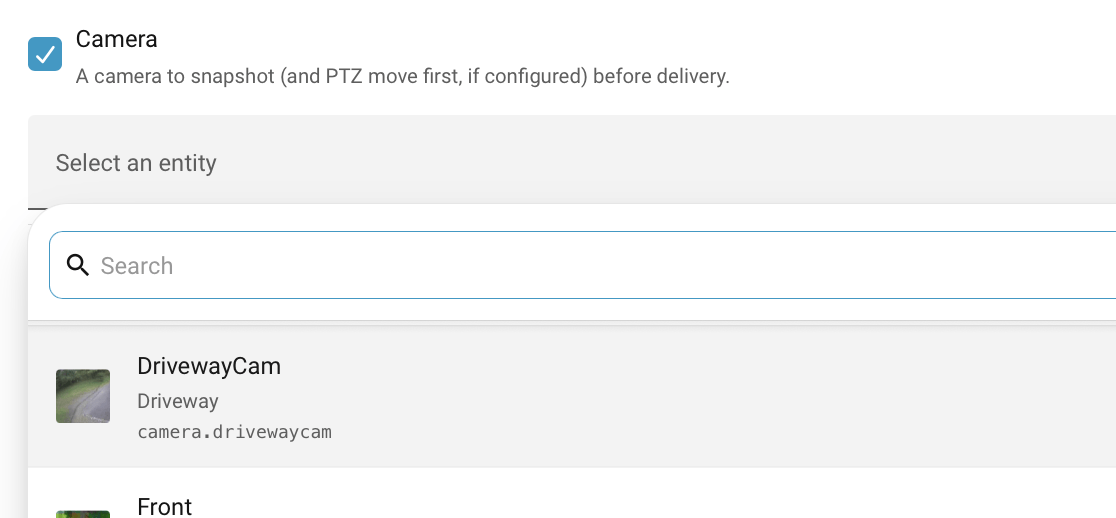
If you were to edit the YAML for the automation, the action would look like:
  - action: supernotify.notify
    data:
      title: Front door
      message: Someone is at the front door
      media:
        camera_entity_id: camera.porch
      delivery:
        - alexa_devices_announce_all
        - mobile_push
Supernotify takes one snapshot from the camera and gives it to each delivery that can show a picture. The speakers still just say the message, and the phones show the picture with it.
Snapshots are stored for a while on the file system, so check the Multimedia Basic Configuration if the picture doesn't arrive.
Variations
Chimes
Play a doorbell sound instead of, or as well as, the spoken announcement, on Alexa devices, sirens or cheap 433Mhz chimes. Set up a doorbell alias as shown in Chime, then ask for that tune:
E-mail or Text if Nobody is Home
A spoken announcement is no use to an empty house. Give the email and sms deliveries an occupancy of all_out, so they are only used when everyone is out:
transports:
  email:
    delivery_defaults:
      occupancy: all_out
  sms:
    delivery_defaults:
      occupancy: all_out
Then add email and sms to the deliveries in the action. The e-mail has the camera picture attached.
This needs an e-mail address or phone number for each person, see People, and for texts one of the SMS integrations.
Don't Announce to an Empty House
Set Spoken delivery occupancy to only_in in the integration's Configure option, under Delivery Control, so the speakers stay quiet when nobody is home. See Delivery Control.
Only Some Speakers
Leave out alexa_devices_announce_all, use the alexa_devices delivery, and choose the speakers as targets, by entity, area, floor or label. See Targets.
Move the Camera First
If the porch camera can pan, tilt or zoom, have it move to the door before the snapshot.
Further Reading
- Alexa Devices Transport
- Mobile Push Transport
- Home Alone, for changing notifications by who is home